
About this sample
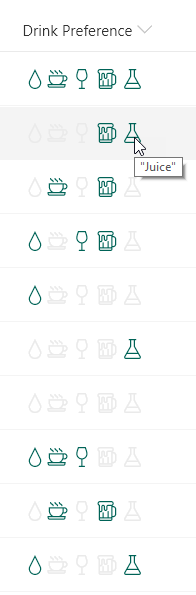
This sample demonstrates using the indexOf and join functions (O365 only) to test if a multi-select choice field has a selected choice. Providing icons of the known choices and applying themed colors based on if the given choice is selected or not creates an intuitive, easy to understand visualization that doesn't suffer from varying item order or text formatting issues.
Products & metadata
SharePointMicrosoft ListsColumnSharePoint OnlineIconsMulti-ChoiceindexOf, joinms-fontColor-themeDark, ms-fontColor-neutralLightColumn Formatting